All Tips for Bloggers | Blogging Tips | Affiliate Marketing |
Make Money Online | SEO Tips |

Saturday, December 11, 2010

SEO Tips for Blogger - Part 1


Search Engine Optimizatio or SEO - All of you might have heard of it??So what exactly is it? 

What do we do to make our BlogFriendly to our readers? - We do change the layout and design so that our blog looks elegant to eyes. 

What do we do to make our Blogfriendly to Search Engines like Google,Yahoo and Bing? - Here is where we should do SEO.. 
Unlike Wordpress and other blogging platforms,Blogger automatically does some SEO work for us making the job easier for us.Still there are some areas where we can do something 

Here is a collection of My SEO tips for my beloved readers.. 

1) Don't put too much posts on homepage - When you put too much content onhomepage, it leads to duplicate content. Means many pages on your blog will have similar content. Your latest post page and your homepage has got the same content rite? 

2) Submit a Sitemap to Google Webmaster Tools 

3) You will have links to feeds on your pages. Or may be some links to social bookmarking sites. Too many links on a page makes it unfriendly for search engines. So you should add the rel='nofollow' tag to such not so important links.. 

- Feed links (The blog feed has same content as your blog.So it is important that you make the feed links nofollow) 
- Social Bokkmarking links - If you use social bookmark buttons like that for digg,stumble twitter etc, try making them nofollow.. 
- Links to unimportant pages(unimportant to search engines.. ;) )like contact me page,link to me page,about me page etc.. 
<a href="link url">link name</a> is a dofollow url 
<a href="link url" rel="nofollow">link name</a> is the nofollow version of the same link 

4) Use the Title Tag Hack 

5) Use Meta Tags 
- What you shouldn't do when using meta tags - I have seen many blogs using the same meta tag for all pages of the blog.You should never use such duplicate meta tags, I suggest that you use a separate meta description and keywords for your home page.You can use b:if conditions to do this. 

6) Get back links.. Get more links to your site from your friends.. ;)  You can also add aLink to your site Widget . 

7) Submit your blog to Directories. - One of them is here Blogger Directory 

8)I won't add a archive widget.If i do it i will display it on a particular page only. - Why? The archive widget has so many links in it..As i said too many links on a page is unfriendly to search engines. 

9)Don't add additional ROBOT meta tags.. Some guys try adding tags like <meta name='robots'...... > 
Blogger automatically does some SEO for it.. Don't override it. You know something? Every blogger blog has got a robots.txt file.. see mine.. http://www.bloggerplugins.org/robots.txt Off course we cant edit them. 

10)When building back links use your primary keyword as the anchor text. <a href="">Anchor Text</a> - > Just to explain what an Anchor Text is. 
I use Blogger Widgets as my Anchor Text. 

11) Use Alt tags for images. When you use images try to add alt tags. For example <img src="imageurl"/> can be replaced as <img src="imageurl" alt="Some alternate description for the image"/> 

12) Focus on what you write. Always try to write some unique and interesting content.You cant hope to be on top of search engines with copy paste blog posts.. 


Blogger Seo Tips – Part 2


On the first blogger seo tips post, I went through the basic settings that you should modify on theblogger.com setting area. On second part, I will show you how to optimize your blogspot/blogger templates. Default templates offer none SEO whatsoever causing most blogger users to rank low on SERPs.
There is one thing I love about WordPress: the <!–more–> tag! Blogger does not have this. This can result in duplicate content entries, showing the same content on post pages and archive pages. You do not want to have the same content on different pages of your website.
Blogger does not have this built in, so we are going to do a small tweak to accomplish that. Make sure you have selected a widget-ready template. There are couple of steps, so read the whole post carefully. Place the below code before the </head> html tag in your template. Its a small javascript.
Download the first code
Second step involves changing the post includables. If you do not have a widget-ready template, you will not be able to apply this step, since non-widget-ready templates do not have includables. To get to the post parte, where you will change the code, search for id=’post’. If you are unable to find it, you may not have expanded the template. Select the checkbox named “Expand Widget Templates“, which is right above the template code, to expand it into more code.
Download the second code
Now, go to Settings –> Formatting and paste the below code inside the text box labeled “Post template”:
Type your summary here
<span id=”fullpost”>
Type rest of the post here
</span>
When you create a new post on your blogger blog, this will clearly show where to write your summary or excerpt, and rest of your post text. It is important to make sure that the /span tag above is at the end of the post. So before publishing your post, check the html source code and make sure that </span> is at the end of your post. The “Read more” link will appear only for the posts that have been divided like this.


Blogger Sitemap Generator - Submitting Your Sitemap to Google, Bing, Yahoo


One thing that you can do to make your blog indexed fast by search engines such as Google, Yahoo, or Bing is by sending the sitemap address of your blog. Previously, Maybe you have known that sitemap address for blogger only added the code "atom.xml" at the end of your blog address, e.g. Wonderful-Tricks's blog has the address as follow:

http://www.wonderful-tricks.blogspot.com/

so the sitemap address to be registered would be:

http://www.wonderful-tricks.blogspot.com/atom.xml

If you use the feedburner service and then you redirect the feed address to sitemap address given by feedburner, there will be a notice that the sitemap you have submitted experiences error. The solution to this error is by adding one code ?redirect=false. For example, the sitemap address below runs error:

http://www.wonderful-tricks.blogspot.com/atom.xml

So to remove this error notice from Google webmaster tool, the submitted feed address would be added the code ?redirect=false at the end of fee address, e.g.:

http://www.wonderful-tricks.blogspot.com/atom.xml?redirect=false

The error message usually will be lost or it has been overcome, but it still leaves a peace of problem especially that in blogger or blogspot.  It is about the pages indexed although there are a lot of posts in it. For example, Kang Rohman’s blog http://blogtemplate4u.com has 121 posts, but Google webmaster tool records only 20 indexed URLs.
sitemap indexed

This question is often asked by many bloggers using BlogSpot machine. Are you one of them? If yes, please try the best way that I am about to give you below.

The best way to overcome the error message in Google Webmaster Tool is by using Blogger Sitemap Generator. With the Blogger Sitemap Generator, we can create a sitemap for our blogs and proven to be able to overcome the no-indexed posts.
my sitemap
The following are the way to use Blogger Sitemap Generator :

  1. Please visit http://digitalinspiration.com/tools/blogger/sitemap/index.php
  2. Enter your blog address into the empty field available, do not forget to write your complete blog address including the http:// and ends with / (slash) (e.g. http://www.blogspottutorial.com/ ), and then click the Create Blogger Sitemap button.Blogger Sitemap Generator
  3. Records the sitemap address, copy and paste in notepad or other programs, e.g.:

    • atom.xml?redirect=false&start-index=1&max-results=500
    • atom.xml?redirect=false&start-index=501&max-results=500
    result of sitemap generator
  4. Also click the links to submit to Bing and Yahoo.
For those who have more than 500 posts, the sitemap address would be more than one,
For the next step, please login to Google webmaster tool to submit the sitemap you have created. If you don’t have Google account, please register here. Below are the detailed steps:

  1. When you are in the dashboard of Google webmaster tool, please find the blog that you want to submit its sitemap.
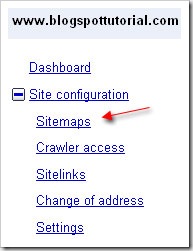
  2. Click Site Configurationsite configuration
  3. Click Sitemapssitemap
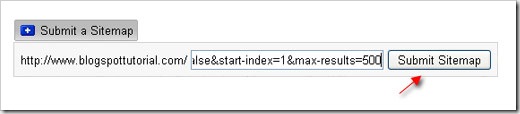
  4. Click Submit a Sitemap button. Copy and paste the sitemap address you have created atblogger sitemap generator (  atom.xml?redirect=false&start-index=1&max-results=500 ), and then click Submit Sitemap. For blog with more than one sitemap ( more than 500 posts ), please repeat this step until all is done.submit sitemap
  5. The submission process of sitemap is done. Usually, it needs time until one day to get this submission sitemap worked and indexed by Google. Please login again the next day to check out whether your sitemap has worked and been indexed or not.
I hope that with this way, your blogs’ sitemaps will be indexed fast by Google, and I hope the search engines will drive more visitors to your blogs.   
source: wonderful-tricks.blogspot.com


2


1


VIDEO

RECENT POSTS

POPULAR POSTS

ENTER-TAB3-CONTENT-HERE
 

Tipsblogpro Copyright © 2010 LKart Theme is Designed by Lasantha